Managing Access
You can define the actions for access management using the following properties:
|
Property |
Description |
|---|---|
|
Card and PIN schedule |
Use a schedule to specify the time when door access requires a card and PIN for dual factor authentication. |
|
Card or PIN schedule |
Use a schedule to specify the time when door access requires either a card or PIN. If a schedule is not defined, then card only is the default. |
|
Door contact input |
Input on the controller signals the door state of open or closed. |
|
Egress input |
Input on the controller signals user's exit. Access is granted through a door using a push button (or something similar). |
|
Egress schedule |
Use a schedule to specify the time the egress input is allowed. If a schedule is not defined, then the egress will always work. |
|
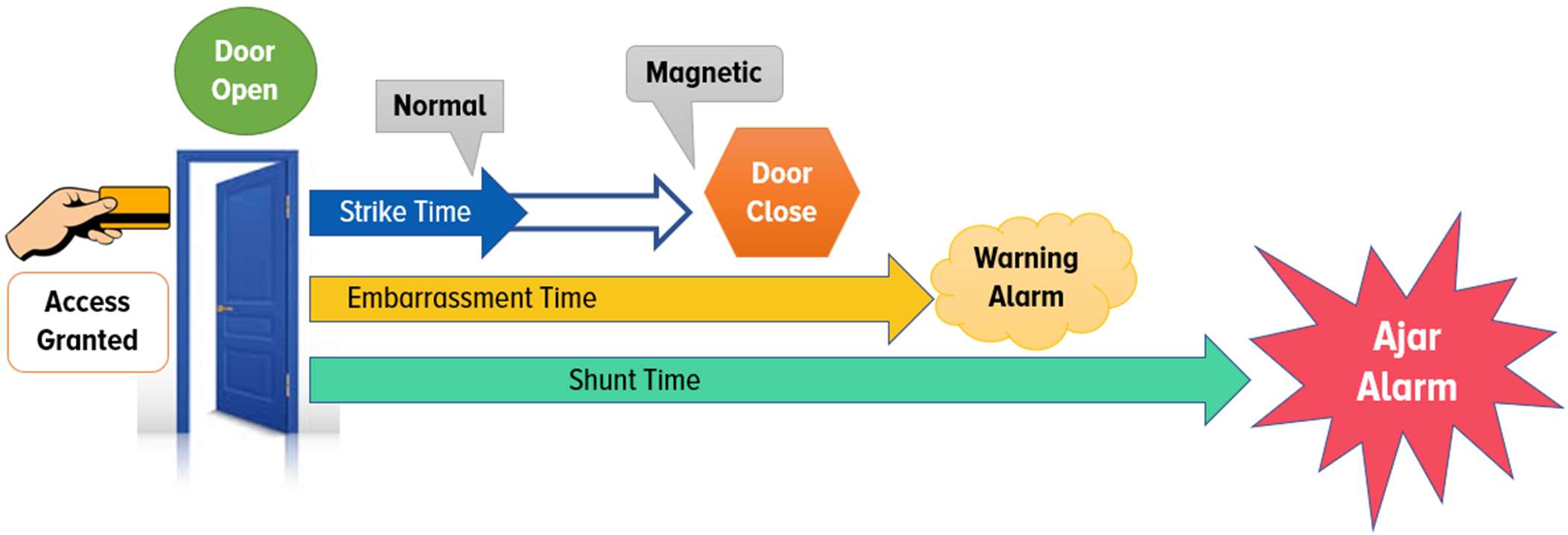
Embarrassment time |
This is the time within the shunt time when the system sounds a medium warning beep. |
|
Lock schedule |
Use a schedule to specify the time a door remains locked. |
|
Shunt time |
The time the door is allowed to be open. |
|
Strike output |
Output on the controller signals the door strike activation. |
|
Strike time |
The time between the door access and when the door contact is active. For a normal lock type, the strike output deactivates when the door contact immediately is active. For a magnetic lock type, the strike output deactivates when the door is opened and activates when the door is closed. |
|
Unlock schedule |
Use a schedule to specify the time a door remains unlocked. |