Arming the System
Arm your system to prevent unauthorized access.

-
Press
 or
or  .
.
-
Swipe your access card or enter your PIN.
-
Press
to fully arm all areas.
The arming process begins. The Alarm Keypad buzzer beeps during a set Exit time.

Once this is done, the system is armed.
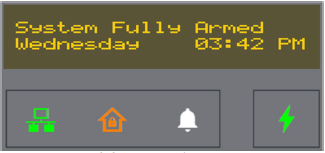
The Status Display returns to the fully armed idle display and the Arm Status LED is colored Amber.
-
Press
or  .
.
-
Swipe your access card or enter your PIN.
-
Use the keypad arrow keys to select the Choose option for selective arming.

-
Use the keypad arrow keys to go through the list of available areas.

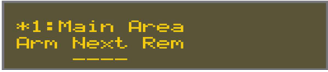
Available commands:
Option
Description
Add
Include the area for multiple selections.
Next
Toggle to the next area.
Rem
Remove the area from the selection.
-
Press
.The selected area is armed. Alarm Keypad set up options can be accessed and the Alarm Status LED is Green.