Pulse Counter
You can receive pulse signals from a third party device (water meter, power meter, etc) to count the number of activations. Use the connection pairs of Inputs 5 and 6 or Inputs 7 and 8 on PL2 for wiring to have a maximum of 4 pulse counters on the S1000 Controller.
|
IN5 and IN6 as connection pairs
|
IN8 connected and IN7 not used
|
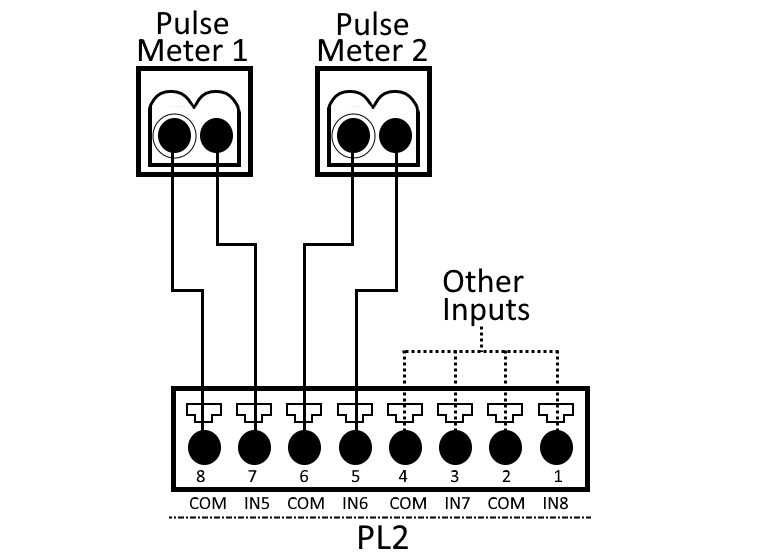
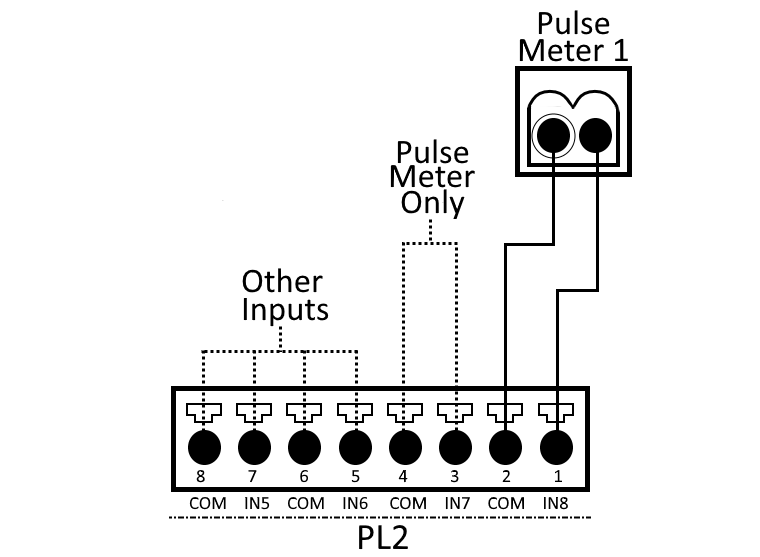
Installing a pulse counter on an input, locks out the connection pair.
If IN5 is used as a pulse counter, IN6 is locked as a pulse counter only input, even if it is not used. This also applies to the IN7 and IN8 connection pair.

|
Field |
Description |
|---|---|
|
Polarity |
By default, pulses are assumed to be active low. This is where the input line is normally high, but a low pulse is counted towards the total pulse count. Active high is also supported for a pulse input. The S1000 Controller supports a dry contact input. If the external device closes a contact on pulse activation, this results in a low polarity input. |
|
Minimum pulse duration |
To account for the variety of pulse generating devices and reduce the likelihood of noise-causing false counts, a minimum pulse duration can be configured from 5ms to 500ms. The default minimum pulse duration is 10ms. |
|
Pulse change value |
Rather than sending the pulse count value to Sonitrol CORE each time it is incremented, you can set this value as the minimum pulse count change of interest. This is dependent on the application. |
|
Reporting frequency |
Similar to analog inputs, if the change in the pulse count value is not greater than the pulse change value, then the current value count is reported at this frequency. |