LED Indicators
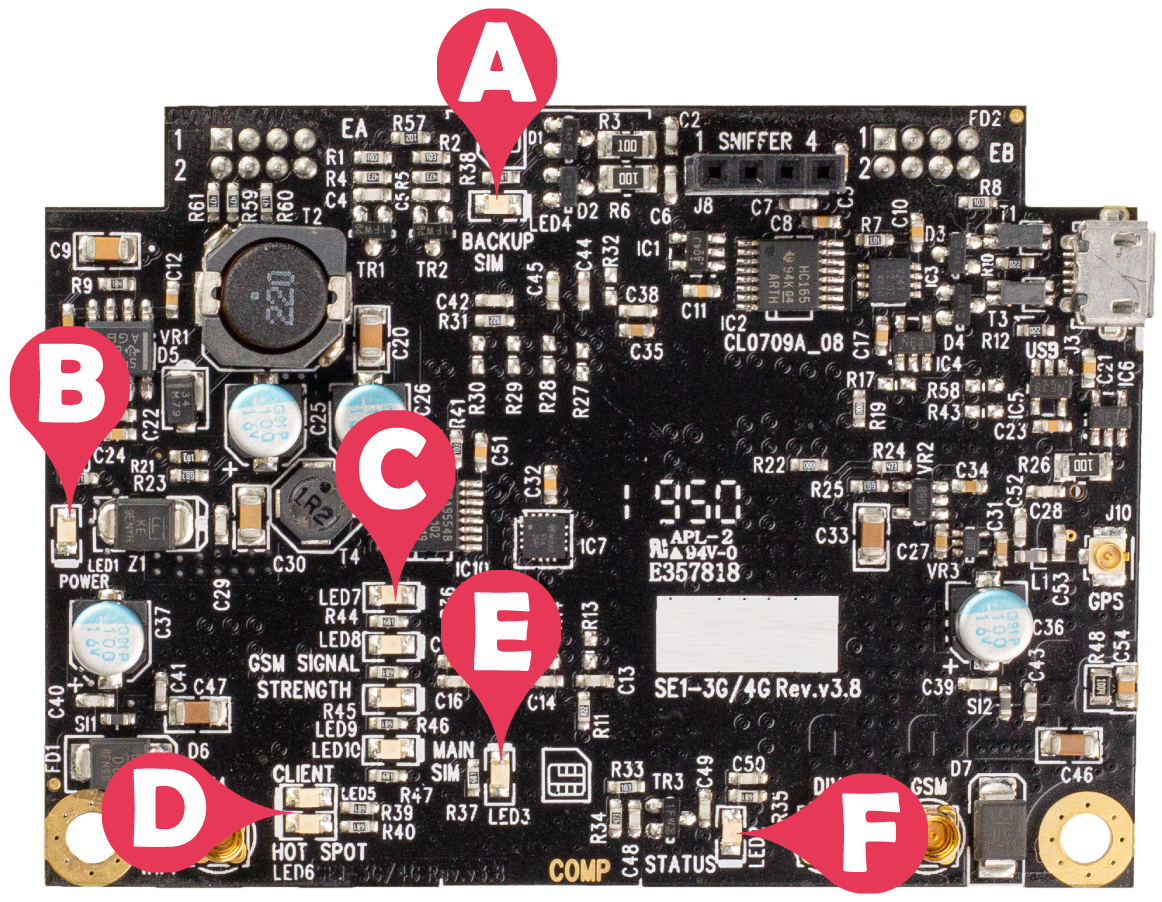
|
Label # |
Indicator |
Name |
State and description |
|---|---|---|---|
|
A |
LED4 |
Backup SIM |
OFF - indicates no backup SIM detected Flashing slowly - indicates connecting ON - indicates sending/receiving data from the backup SIM network |
|
B |
LED1 |
Power |
ON - indicates power is available |
|
C |
LED7 to LED10 |
GSM signal strength |
All OFF indicates no signal All ON indicates strong signal |
|
LED10 |
GSM signal |
Flashing - indicates waiting to detect a signal |
|
|
D |
LED5 |
WiFi client |
OFF - indicates deactivation Flashing fast - indicates connecting Flashing slowly - indicates scanning ON - indicates sending/receiving data from the WiFi network |
|
LED6 |
WiFi hotspot |
OFF - indicates deactivation ON - indicates that the hotspot is enabled |
|
|
LED5 + LED6 |
WiFi client and WiFi hotspot |
ON - indicates loading the WiFi module Toggle 3 times indicates WiFi M2M app is not found Toggle 5 times indicates WiFi M2M app cannot be loaded |
|
|
E |
LED3 |
Main SIM |
OFF - indicates no main SIM is detected Flashing slowly - indicates connecting ON - indicates sending/receiving data from the main SIM network |
|
F |
LED2 |
Status |
ON - indicates sending/receiving data from the GSM network |
|
SE1-CELL-PCB-L GPS Expansion Only SE1-CELL-PCB-L GPS Expansion does not support WiFi, so LED5 and LED6 signify GPS and satellite status. |
|||
|
D |
LED5 |
Client |
OFF - indicates no satellites have been discovered ON - indicates satellites have been discovered as well as their location |
|
LED6 |
Hotspot |
OFF - indicates the GPS is deactivated ON - indicates the GPS is enabled |
|