Error Code Indicators
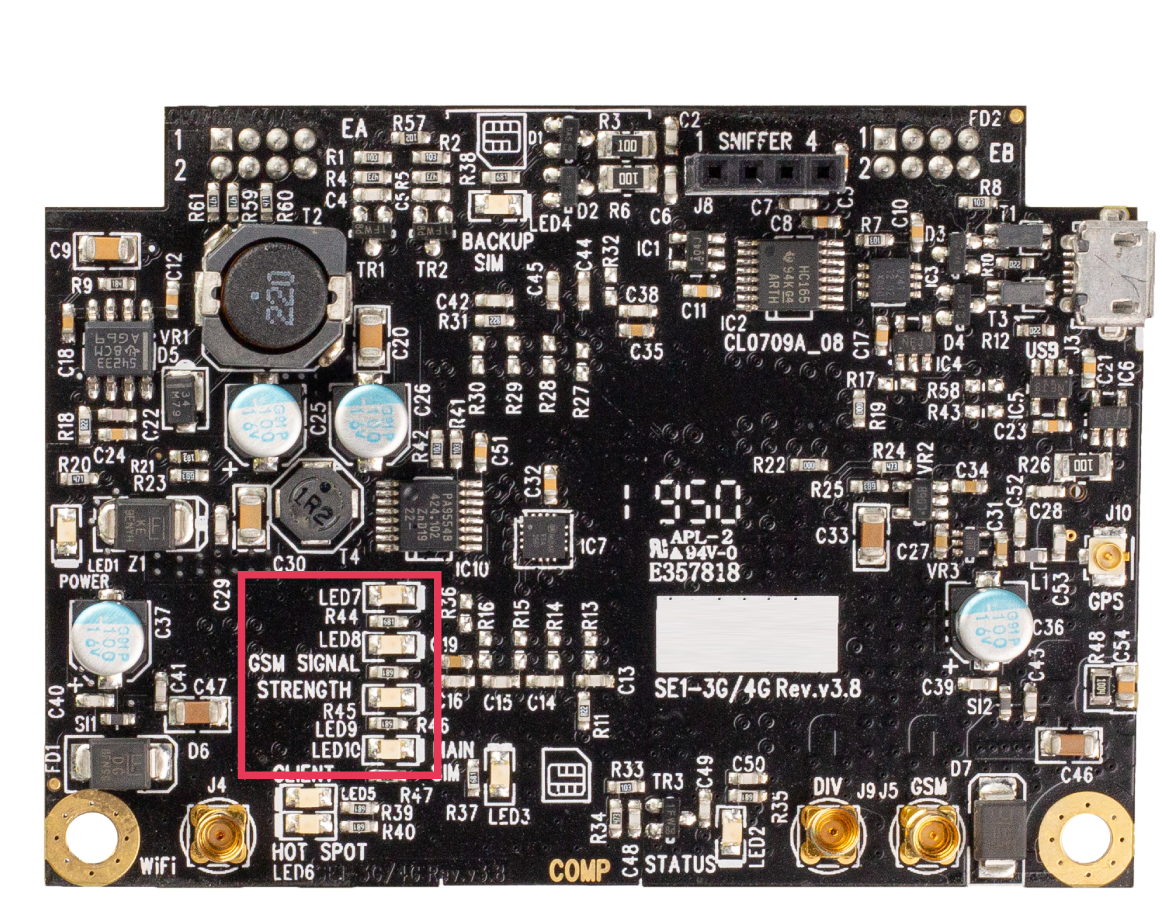
|
LED pattern |
Error code |
Troubleshooting |
|---|---|---|
|
LED7 = ON |
No SIM detected |
Check that the SIM is inserted in either the main or backup and in the correct orientation, with the pins facing up. |
|
LED8 = ON |
No signal detected |
Check that the correct antenna is plugged into the GSM socket. Check that the SIM is registered for the network. |
|
LED9 = ON |
Authorization denied |
Check that the PAP or CHAP settings have the correct username and password. |
|
LED7 + LED8 = ON |
No carrier detected |
Check that APN is correct for this carrier and program in the settings, if needed. |
|
LED7 + LED9 = ON |
Activation error |
Check that the SIM has data available. |
|
LED9 + LED8 = ON |
WiFi scanning error |
Check that the SSID and password match the WiFi network settings. |
|
LED7 + LED10 = ON |
Operator selection error |
Check that the SIM is registered for the network. |
|
LED7 + LED8 + LED9 = ON |
Sonitrol CORE connection error |
Check that Sonitrol CORE settings are correct. Check that Sonitrol CORE is running and the site is commissioned. |
|
LED7 + LED9 + LED10 = ON |
Activate contact error |
Check that the correct antenna is plugged into the GSM socket. Check that the SIM is registered for the network. |
|
LED7 + LED8 + LED10 = ON |
Activate WiFi error |
Check that the SSID and password match the WiFi network settings. |