Setting Up for People Counting
Configure the S1000 to have a pulse counter mapped to an input on the AXIS device. This allows the S1000 to pulse counts from the AXIS Camera when an IN count is changed.
Note: The pulse count input for the AXIS device must be on parent 1 for the AXIS device.
-
Add a pulse counter in Sonitrol CORE.
- The Physical ID on Device must match the ID variable on the AXIS message field.
- Configure the AXIS Camera for people counting.

Refer to the AXIS Camera selection for all models that support this APP. Only the AXIS M3065-V model has been tested with Sonitrol CORE.
- Go to the AXIS Camera configuration URL.
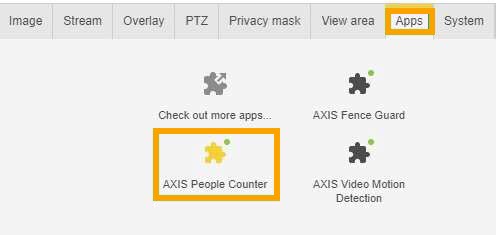
- Click the Apps tab.
-
Click the AXIS People Counter option.
-
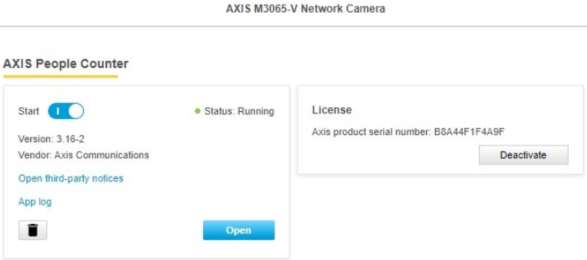
Follow the AXIS People Counter instructions to set the ALPR fields for the application.
-
Configure the People Counter software.
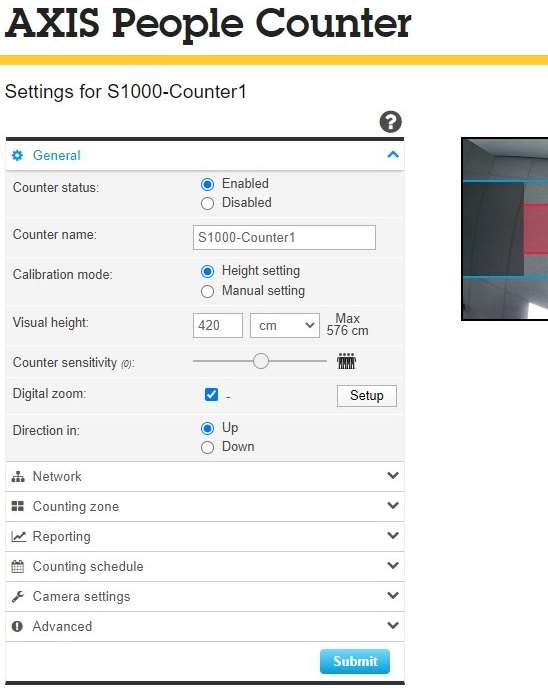
- Click Submit.