Setting up Event Notifications
In order to receive event notifications from the AXIS Cameras:
-
Add a virtual input to Sonitrol CORE.
- Select the Category to be Normal.
- Enter a Tag that exactly matches the TAG variable on the AXIS message field.
-
Set up event notifications in the AXIS Camera App.

- Go to the AXIS Camera configuration URL.
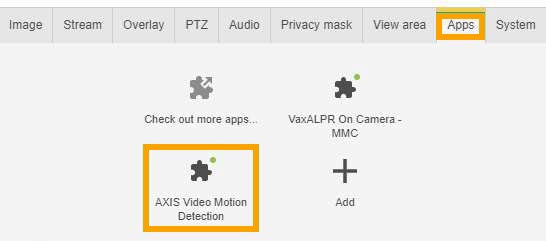
- Click the Apps tab.
-
Click the AXIS Video Motion Detection option.
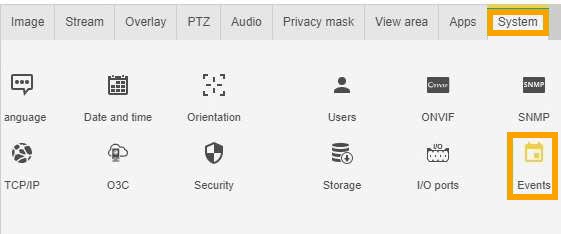
- Click the System tab.
-
Click the Events option.
-
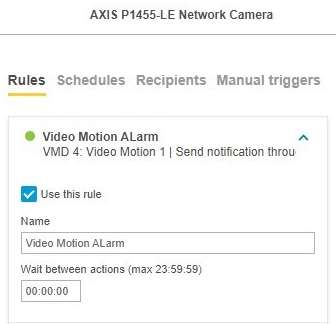
Create or change a Rules Profile.
Select the Video Motion profile created from the Motion App.
-
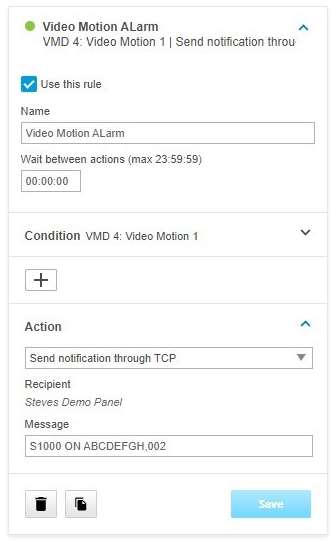
Select the Action to be Send Notification through TCP from the drop-down list.
-
Enter the message to be sent.
This will map to the S1000 virtual event.
The format to the text is S1000 [TAG], [TIME].
Activate input with matching [TAG] for [TIME] seconds.
- Click Save.