Setting Up a License Plate Reader
To integrate a license plate reader with Sonitrol CORE:
-
Add a reader to Sonitrol CORE.
- The Physical ID on Device must match the ID variable on the AXIS message field.
- Select the Mode Change to be None Allowed.
- Select the Card and PIN Schedule to be None.
- Select the Dual Authentication Mode to be None.
- Configure the AXIS Vaxtor Camera to send messages to Sonitrol CORE.

Refer to the Vaxtor information and AXIS Camera selection for all models that support this App. The P1455-LE model has been tested with Sonitrol CORE.
- Go to the AXIS Camera configuration URL.
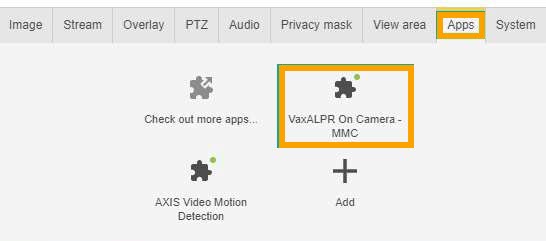
- Click the Apps tab.
-
Click the VaxALPR On Camera-MMC option.
-
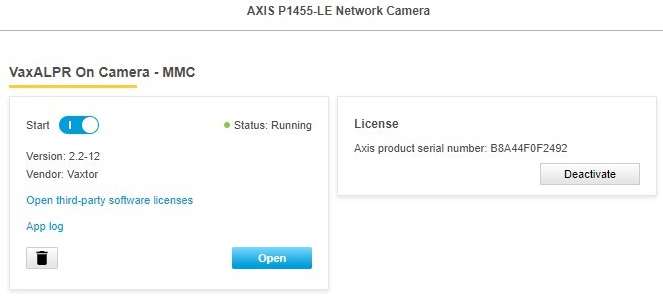
Follow the Vaxtor instructions to set the ALPR fields to suit the application.
-
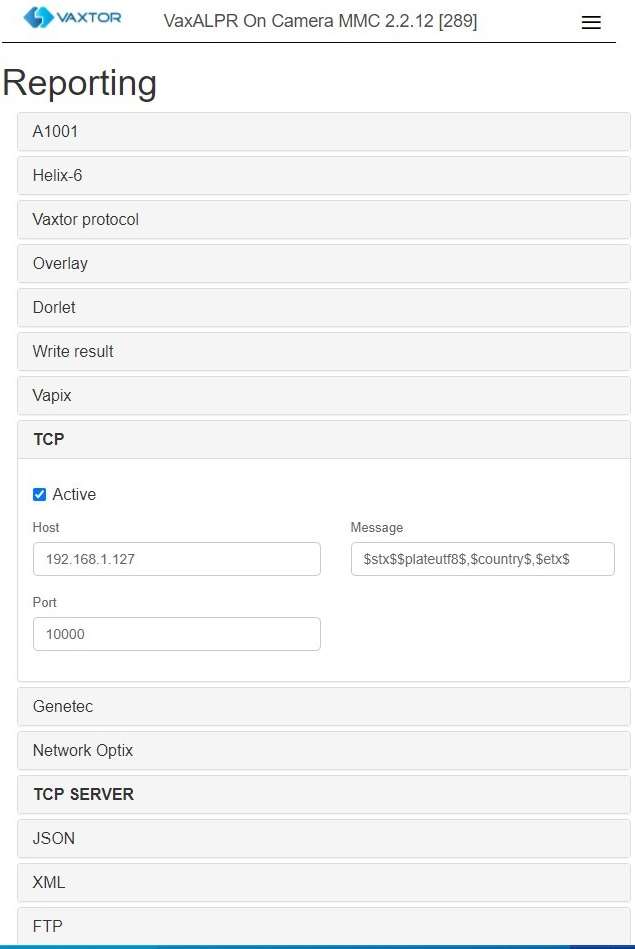
Once the App is running, expand the TCP section to enter:
Field
Description
Active
Tick the checkbox.
Host
Enter the IP address of Sonitrol CORE server.
Port
Enter the port number for Sonitrol CORE.
Message
Enter the message format to be sent to Sonitrol CORE.
The message must contain the following variables so as to read license plates:
- stx$
- $plateutf$
- $etx$
- Click Save.