Keypad Functions
|
Callout |
Description |
|
|---|---|---|
|
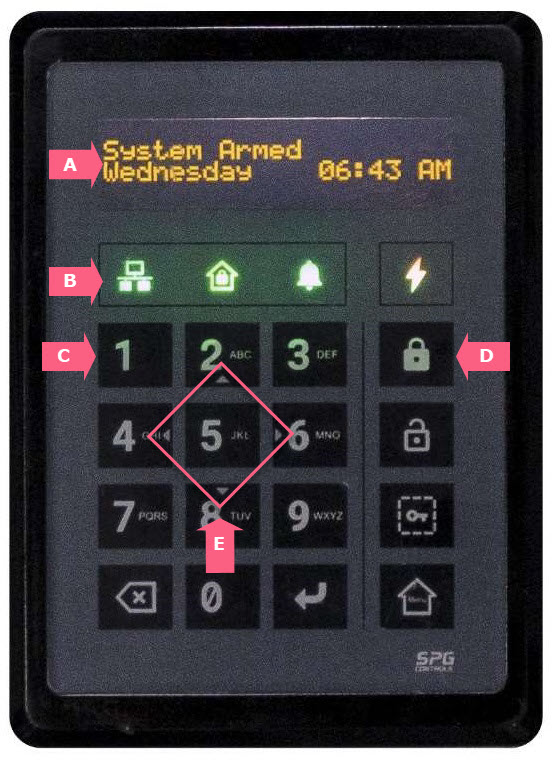
A - OLE Display |
Displays the system status and input requirements. |
|
|
B - Status LED Indicators |
Indicates the S1000 Controller status with different colored LEDs. |
|
|
|
Network Status |
Green - indicates online and working with primary Sonitrol CORE. Amber - indicates online to backup Sonitrol CORE. Red - indicates no communication with the Sonitrol CORE. |
|
|
Arm Status |
Green - indicates full or partial disarm. Amber - indicates fully armed. |
|
|
Alarm Status |
Amber - indicates another device alarm. Amber flashing - indicates controller tamper alarm. Red - indicates a normal alarm. |
|
|
Power Status |
Green - indicates mains power is running normally. Amber - indicates running on battery with no mains power. Amber flashing - indicates battery has low charge. Red - indicates battery power failure. |
|
C - Alphanumeric Keypad |
Input information and configuration settings. |
|
|
|
Cancel / delete |
Cancel a menu selection or delete the current data that was entered. |
|
|
Confirm |
Confirm the menu selection or the current data that was entered. Access the Login screen when idle. |
|
D - Quick Access Keys |
Frequently used commands. |
|
|
|
Arm |
Arm the controller. |
|
|
Disarm |
Disarm the controller. |
|
|
Partially Arm |
Partially arm the controller. |
|
|
Main menu |
Go to the main menu. |
|
E - Navigation Keys |
Directional keys to allow you to move through the menu. |
|