Adding a Schedule
-
Click Schedules on the left navigation pane.
By default, the Schedules tab is automatically displayed.
- Click Add Schedule.
-
Enter a unique and descriptive Name for the schedule.
Up to 255 characters can be entered for a schedule name.
-
Add Tags to include metadata to the schedule.
-
Select the organization for which you want to create this schedule. By default, the schedule is created in the currently logged in organization.
-
Turn on the AM/PM toggle to use 24 Hours format.
-
Click Show full day to display the the 24 hours available in a day. To view only the working hours of a day, click Show working hours only.
-
Set the time intervals for the schedule.
Similar daily time intervals
Use this method if your schedule will include the same daily time intervals for a working week.
-
Click Create Interval on the Schedules page.
The Create Interval dialog box displays.
-
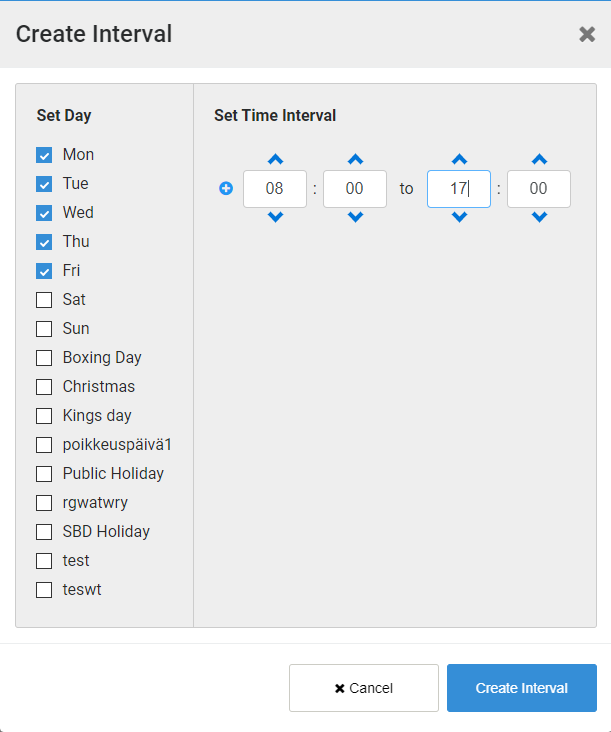
Tick the checkbox next to the day(s) of the week that will have the same set time interval.
For example, week days may have the same time intervals set, and weekends would have different time intervals.
- Enter or select the start time of the time interval in hours and minutes.
-
Enter or select the end time of the time interval in hours and minutes.
If 24 hour is selected, enter the time in 24 hour format.
If AM/PM is selected, enter the time as needed.
For example, setting the time interval for a working week:
-
Click + in front of the current time interval to add another entry to include another time interval, if needed.
-
Click Create Interval.
You are returned to the Schedules page with the time intervals displayed for the selected days colored in green.
-
Continue to create time intervals as required for other days.
Custom daily time intervals
Use this method if you wish to make minor changes to a time interval for a day or to customize the time interval for each day of the week.
-
Click in the start time cell for a day of the week.
A green box displays.
- Drag the bottom edge of the green box to the end time cell for that time interval.
- Continue to add time intervals for this day of the week and other days as needed.
-
-
Click Create.