EN Security Compliance
Improper installation may result in serious injury or damage. Before installation, read and understand these instructions completely.
The S1000 Controller has the following EN certifications evaluated by ALTER Technology TÜV NOR:
|
Certification |
Access Grade |
Security Grade |
Environment Class |
IK |
IP |
ATS |
|
|---|---|---|---|---|---|---|---|
|
EN 50130 Alarm Systems - Electromagnetic Compatibility |
|
|
|
|
|
|
|
|
EN 50131 Alarm Systems - Intrusion and Hold-Up Systems EN 50131-10 EN 50131-3 EN 50131-6 |
|
4 |
II |
|
|
|
|
|
EN 50136 Alarm Systems - Alarm Transmission Systems and Equipment EN 50136-2 |
|
|
|
|
|
SP6, DP4 Type Z |
|
|
EN 60839 Alarm Systems - Electronic Access Control Systems EN 60839-11-1 |
3 |
|
II |
04 |
21 |
|
|
To view and download compliance certificates, go to Sonitrol Support Portal.

The S1000 Controller monitors the connectivity with Ethernet, cellular and PSTN network interfaces (ATP) in the background, at a programmed frequency to ensure the availability of these interfaces at all times. If an issue arises with any of these ATPs, it is reported to the Sonitrol CORE.
Every S1000 Controller has a unique electronic serial number (ESN) that is programmed at the factory. Sonitrol CORE uses this for identification. If an S1000 Controller is substituted with another S1000 Controller, Sonitrol CORE recognizes this and an alert is generated.
Each peripheral component connected on the RS485 network is also identified by its unique ESN or MCU ID when the device comes online each time on a restart. During regular operation, if the device is reported as having been restarted, its ESN or MCU ID is requested and compared with previously stored values. If a device has been substituted, an alarm is reported within 10 seconds.
By default, a PIN requires a minimum of 4 and a maximum of 8 digits.
For EN 50131 compliant systems, a PIN can be configured to require a minimum of 6 digits. The Alarm Keypad automatically locks when an invalid PIN is entered 3 times. The lock duration is 90 seconds.
Four user access levels exist to categorize the ability of users to access system components and controls.
|
Level |
User role access |
|---|---|
|
1 |
Custom User Access |
|
2 |
Normal User Access |
|
3 |
Engineer User Access |
|
4 |
Sonitrol CORE App Access |
Various rules (programmable functions) are available for the user to configure.
The S1000 Controller features anti-tamper protection against attempts to interfere with the device. The enclosure lid tamper sensor and enclosure off-the-wall tamper sensor can be enabled or disabled by placing a shorting plug on the respective 2-pin headers.
The Alarm Keypad includes anti-tamper features to protect against attempts to interfere with the device. An M5 screw prevents access to the enclosure and a tamper switch triggers an alarm if there is a system breach.
The Card Reader Interface Board includes anti-tamper protection against attempts to interfere with the device.
The Alarm Keypad allows you to inhibit / isolate device alarms. Each inhibit / isolate alarm sends a restore event notification to Sonitrol CORE. Inhibit event notifications contain the previous and current inhibit alarm flags. When all alarms are uninhibited / de-isolated, the current inhibited alarm flags are empty.
The Alarm Keypad allows you to isolate any device alarm for a set duration or permanently. When the set duration expires, the isolated alarms are automatically de-isolated and Sonitrol CORE receives device alarms normally.
All alarm conditions will latch, if the corresponding configuration property is set. For the S1000 Controller and all peripheral devices, the latch configuration is stored in the S1000 general configuration memory. When any of the configuration alarm latch flags are ON, only the corresponding alarm condition is notified (an event is sent) but not the restore condition. On the other hand, when a configuration alarm latch flag is OFF, both the alarm and restore conditions are notified (both events are sent).
The following table lists the input alarms that can be latched or become suspect, and the suspect activation count that applies to each of them.
|
Alarm type |
Configured latch flag |
Suspect activation count |
|---|---|---|
|
Tamper |
Tamper |
10 times |
|
Alarm |
Alarm |
10 times |
|
Fault |
Fault |
10 times |
To restore one or more device latched alarms:
- Reset all latched flags for all alarm conditions that need to be restored.
- Reset all suspect activation counts for all alarm conditions that need to be restored.
-
Check each of the alarm conditions that needs to be restored.
If the alarm condition is no longer present, then set the corresponding masked alarm state. This restores the stored masked alarm condition and sends an alarm restore event to Sonitrol CORE for the alarm that was restored.
The Alarm Keypad receives power from the S1000 Controller. Alarms can be latched with the following status:
- AC fail
- battery fail
- battery charger fail
- temperature.
The S1000 Controller uses type A power supply as it contains both mains as well as rechargeable backup battery.
The S1000 Controller employs integrated battery charging and power supply monitoring circuit that controls battery charging function and monitors various voltages and conditions through analog signals, and any reportable changes are communicated to the Monitoring System – typically Sonitrol CORE or similar.
Recommended battery settings are:
-
Failure threshold to low voltage - 10.8VDC
-
Deep discharge protection - 10.6VDC
The S1000 Controller uses specific wired interconnection.
The S1000 Controller has an integrated Alarm System (AS) and an external connection is not required.
All events are recorded and saved using the Store and Forward operation. The S1000 Controller can indefinitely store event records in EEPROM. This does not require any battery.
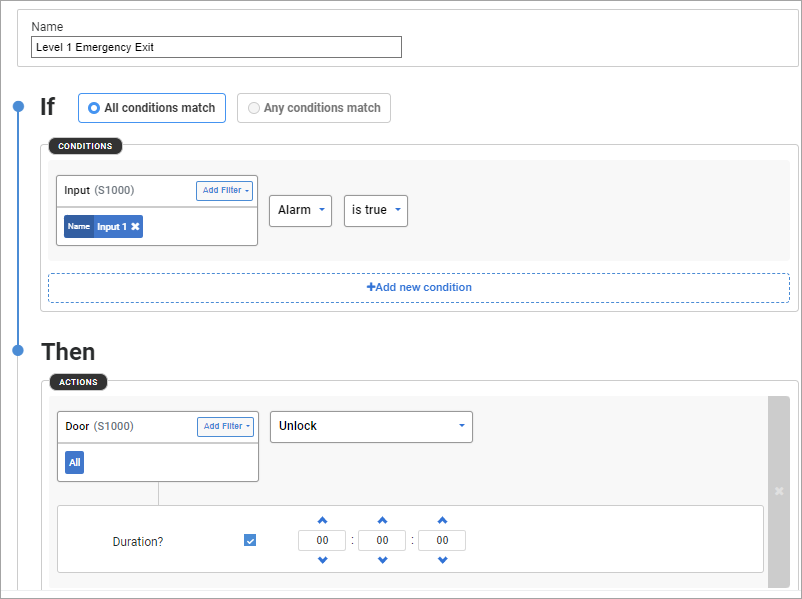
EN 60839-11-1 requires that the electronic access control system shall not prohibit the free exit granted by other emergency systems (For example: fire, environmental). This can be provided through the controller configuration using macro functions.
For example, a macro can be configured to unlock all doors when an alarm is triggered. Set the duration to zero to permanently unlock the doors until the alarm is restored.
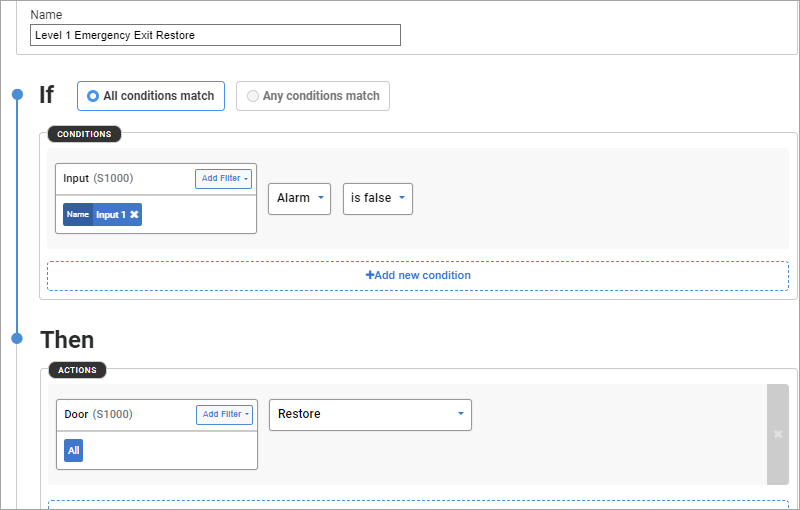
Example of a rule configured in Sonitrol CORE is shown:
When the alarm is reset, all the doors can be restored.
In case of loss of communication between the S1000 Controller and Sonitrol CORE, the console generates an "Offline" event in the event store to indicate that the controller is offline and is not in communication with the console.
When the event log reaches 90% of the logging capacity, the S1000 Controller will generate the following events:
-
Event Queue 90% full - Generated when the last event added has caused the pending events in the queue to reach 90% of its capacity. (900 normally, or 58500 with an SD card)
-
Event Queue Overflow- Generated when an ARC table has had its event queue full, and a new event will cause old events to be lost.
If the functionality of the access control unit cannot be restored due to data corruption or data lose following an automatic restart, a trouble condition must be annunciated.
S1000 Controller sends the following events in case of a failure to read the main configuration from EEPROM or extended config settings from SD card.
-
Failure to read config from EEPROM will result in ConfigurationDefaultedEvent (Event Id 2009) with Reason code set to EEpromError (Code 2).
-
Failure to read config from SD card will result in SDCardAccessFailedEvent (Event Id 2006) with Status not set as SDCard_PresentAndWorking (Code is set to anything other than 2).
Means of access to the internal elements of components of an access control system shall require the use of a tool. The enclosure housing the S1000 Controller requires a screw driver to unscrew the four screws used to secure the lid. As soon as the enclosure lid is opened, a tamper alarm is triggered to signal that the enclosure has been opened.
The Alarm Keypad includes anti-tamper features to protect against interference attempts to the device. A M5 screw prevents access to the keypad enclosure and a tamper switch triggers an alarm if there is a system breach.
For EN 60839-11-1 compliant systems, access requires a card and PIN authentication. Either a PIN or a card only access is not allowed.
For EN 50131 compliant systems, the PIN must be at least 6 digits and the maximum number of logical combinations is 1000000. Non-EN 50131 compliant systems can have a minimum of 4 digits for the PIN and a maximum of 8 digits.
The pre-set values for logical access can be overwritten.
Sonitrol CORE enables you to automatically configure your system into EN Grade 3 or EN Grade 4 compliance on the S1000 Hardware Profile.
Profiles are auto-configured with the following settings:
- All Keypad lockout are set to 90 seconds.
- S1000 Alarm Latching toggles set to ON.
- Click Hardware on the left navigation pane.
-
Click Profiles on the top navigation bar.
The Hardware Profiles page displays.
- Find and select the profile you wish to make changes to.
-
Click Edit on the profile tile.
or
Click
 then select Edit from the list.
 -
In the Edit Profile page, click the Configurations tab.
This is normally displayed by default.
- In the S1000 section, click Configure on the specific S1000 tile.
-
On the S1000 Configuration dialog box, go to the Core tab.
-
Select one of the EN Grade options Operation Mode from the drop-down list.
- EN Grade 3 - use the EN 50131 compliant Grade 3 operation settings.
- EN Grade 4 - use the EN 50131 compliant Grade 4 operation settings.
-
Click Close.
The following listed features of the S1000 Controller and related peripherals are not mandatory requirements for EN 50131 and, therefore, are not evaluated by the certification body.
|
Peripherals |
Model |
Details |
|---|---|---|
|
RS232 interface |
SE1-485-PCB |
Optional feature |
|
Network ports |
SD1-REMIO-PCB SD1-AUDIO8-PCB |
Currently not supported in application firmware |